
Placing Your Friendship Lamp Order
Need to change how many lamps are in your cart, or running into trouble at checkout? Tap the shopping bag icon at the top right of the screen to go back to your cart, or head straight to luvlink.com/cart. For payment issues, try clearing your browsing data or switching browsers. Here's how to handle each situation.
How to change your order quantity
If you've added too many lamps — or not enough — you can fix that before you pay.
- Look for the shopping bag icon in the top right corner of the screen.
- Tap or click it to go back to your cart.
- Update the quantity there.
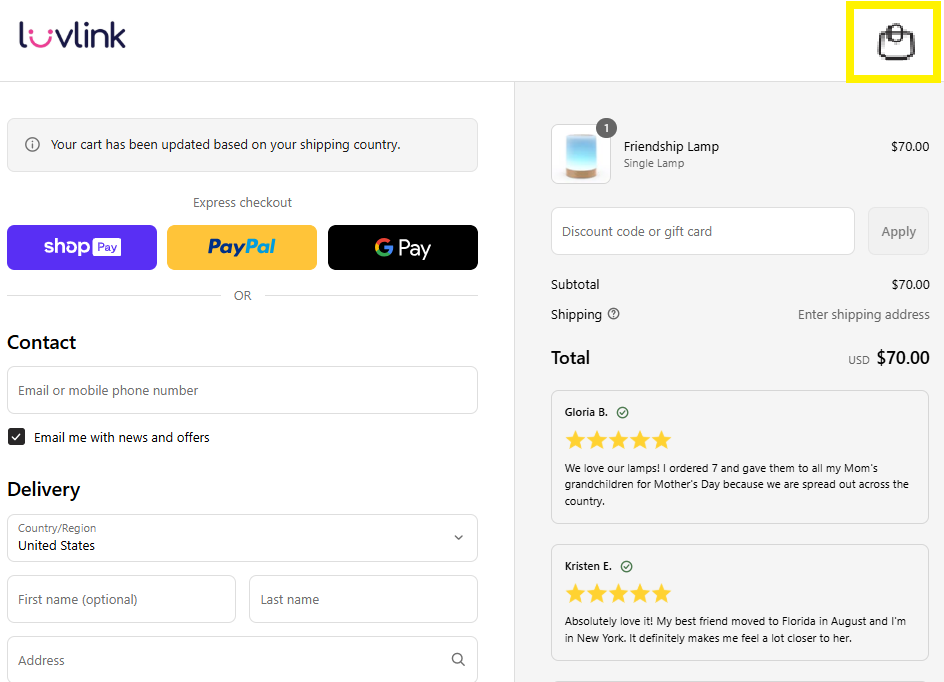
You can also go straight to your cart here: luvlink.com/cart.
Having trouble placing your order?
If payment isn't going through or you can't complete checkout, try these steps:
- Clear your browsing data.
- Try a different browser.
- Attempt your order again.
If it's still not working, get in touch via our contact form or the live chat on our website. When you reach out, please attach a photo or screenshot of any error message you're seeing — that helps us work out what's going wrong.
Look out for your welcome email
Once your order goes through, you'll get a welcome email with:
- Your order confirmation details
- Your tracking link
Didn't receive your confirmation email?
There are a few reasons this can happen:
- Your order may still be processing.
- The email may have landed in your spam or junk folder — worth checking there first.
- You may not have added your email address to the order.
- You may have used a different email address than you expected.
- The email address entered at checkout may have had a typo.
- Your order may not have gone through successfully due to a transaction error.
If you have your order number, send it to us via the contact form and we'll look into it. No order number? Just send us the email address and the full name you used when purchasing, and we'll find it from there.
Need to track your order? This article has everything you need: Tracking your order.